ChatGPT Colab Plugin
Ask your dot to use Colab.
Run Colab notebooks in ChatGPT using your own Colab compute credits. Ask your dot or ChatGPT to write Python, run cells, and bring back the results.
Use your own Colab compute credits
First deploy your own private backend and connect your Google account.
From a request to results you can keep.
The plugin exposes notebook tools through the Model Context Protocol (MCP), connecting your dot to your private backend and your own Colab runtime.
Connect once
Create your private Site, authorize Google, and make the private plugin tools available to your dot.
Describe the work
Ask your dot to write cells and run Python, or edit them yourself and press Shift + Enter.
Save and release
Retrieve charts, data, and the .ipynb notebook. Release the task runtime after saving the results.
A first request for your dot
After setup, use a small synthetic dataset to check the whole workflow. This example only needs a CPU.
Use my Colab plugin to create a CPU notebook. Generate 100 synthetic sales records with a fixed random seed, summarize revenue by product, and draw a bar chart. Save sales.csv, summary.csv, and revenue.png in outputs, export the notebook for me, and release this task’s runtime when finished.
A conversation, with a notebook you can inspect.
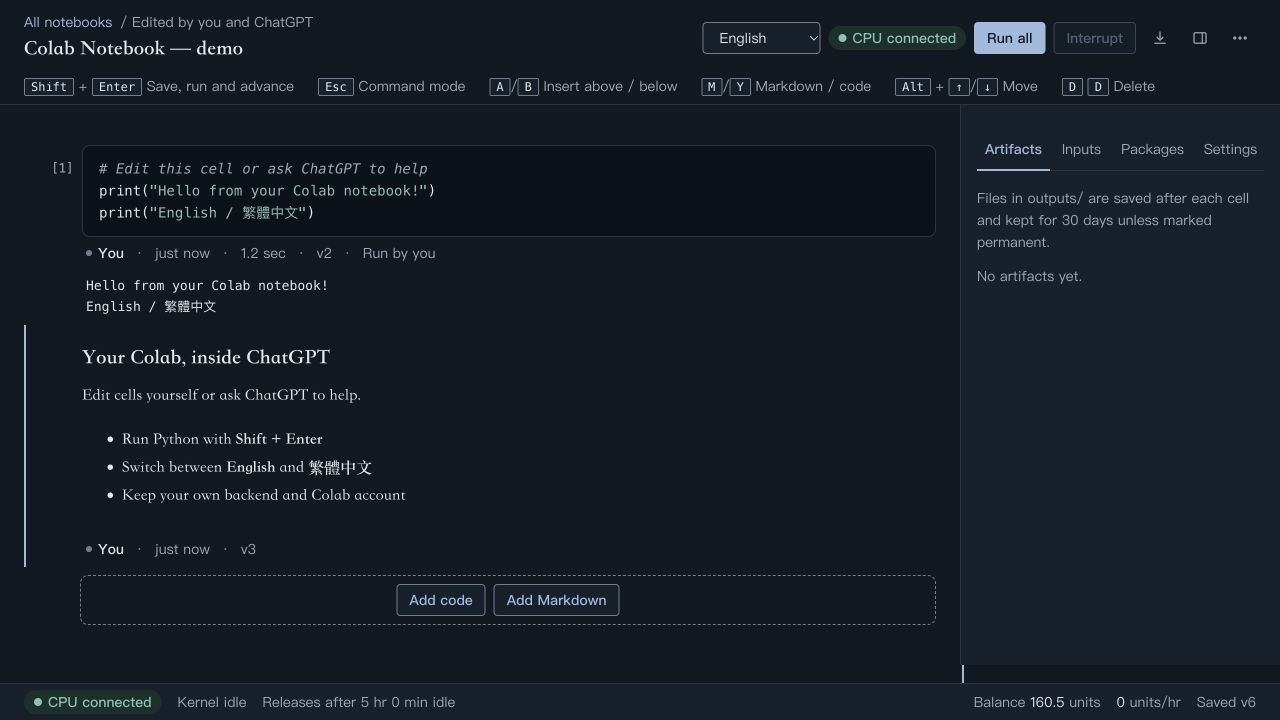
Edit yourself. Or ask your dot.
Keep code, Markdown, outputs, and execution attribution together. Switch the notebook interface between English and Traditional Chinese.
Use your own compute
Code runs on your Google Colab account. Choose CPU or GPU compute to suit the task.
Take the results with you
Export .ipynb notebooks and download generated data and charts for review, sharing, or further research.
Before your first notebook
Can my dot use this plugin?
Once your private plugin is connected, your dot can use its notebook tools. Read the official permissions guide.
Whose Colab credits does it use?
Your own Colab account and compute credits.
Can I use a GPU?
Ask your dot to check current eligible hardware, then select a GPU suited to the workload. The starter tutorial uses CPU compute for a small data analysis.
Connect your compute. Give your dot a task.
Follow the complete guide from private setup to your first saved analysis.
Start your first notebook